
Flock is our open-source framework for multi-agent systems built on a blackboard. A Flock crew is a set of agents that react to typed artifacts on a shared blackboard, and the answer is whatever the crew publishes while the cascade runs. That model makes parallel work and joins almost free. It also makes hosting hard: put a crew behind a request/response endpoint, and you have to answer which artifacts belong to which request, when a request is done, and what the caller gets to see.
Microsoft Foundry hosted agents are the natural place to run such a crew on Azure. You package the agent as a container, and Foundry Agent Service runs it behind an OpenAI-compatible Responses endpoint, with conversations, streaming, an Entra identity per agent and scaling handled by the platform. Microsoft documents that path for the Agent Framework and LangGraph, where a request enters one graph or agent loop and the answer comes out at its end. For a Flock crew, our position is simple: one request should be one isolated blackboard. With flock-core 0.5.700, Flock ships exactly that as FlockApplication, plus a Foundry adapter in the new flock-core[foundry] extra.
Flock in 90 seconds
Flock is a blackboard architecture for LLM agents. Agents do not call each other and nobody wires a graph. Each agent declares which artifact types it consumes and which it publishes, as Pydantic models, and Flock schedules it whenever a matching artifact lands on the blackboard. Parallelism and joins fall out of those contracts: two agents that consume the same type run concurrently, and an agent that consumes two types waits for both.
Here is the incident-triage crew we use throughout this post, taken from the sample in the Flock repository:
from pydantic import BaseModel, Field
from flock import Flock, WorkflowContext, flock_type


@flock_type
class IncidentRequest(BaseModel):
    report: str
    history: list[dict[str, str]] = Field(default_factory=list)


@flock_type
class IncidentTriage(BaseModel):
    """Internal: severity and affected component. Never returned to callers."""

    severity: str = Field(description="low, medium, high or critical")
    component: str = Field(description="The affected system component")


@flock_type
class IncidentSummary(BaseModel):
    summary: str = Field(description="Two sentences for the on-call engineer")


def build_flock(context: WorkflowContext) -> Flock:
    flock = Flock("azure/incident-model", no_output=True)
    flock.agent("triage").description(
        "Classify the incident report; use the conversation history for context."
    ).consumes(IncidentRequest).publishes(IncidentTriage)
    flock.agent("summarizer").description(
        "Write a short, actionable summary for the on-call engineer."
    ).consumes(IncidentTriage).publishes(IncidentSummary)
    return flock
triage reacts to the request and publishes an IncidentTriage, which in turn triggers summarizer. The topology is a consequence of the types, not something we declared, and the same types double as the structured output schema for the model. IncidentTriage is an intermediate result: useful on the blackboard, but not something a caller should receive. For readability, this version uses Flock’s default engine; in the model access section we swap in an engine that authenticates with the hosted agent’s identity instead of an API key.
Flock already had a way to serve a crew: flock.serve() runs one long-lived blackboard with a REST API and a live dashboard. That is the right tool for a shared workspace. It is the wrong tool for a hosted agent that answers independent requests from many users.
Why hosting a blackboard is different
When we first put a Flock crew behind a Foundry endpoint, we wrapped one long-lived blackboard in a request handler. It worked in the demo and failed on four problems as soon as we thought about real traffic.
- Shared state: one blackboard holds every caller’s artifacts, and batches, joins and context are keyed per agent, not per request.
- Completion: a cascade has no final step, and only an explicit list of public outputs says which artifacts are the answer.
- Failures and cancellation: every request needs one truthful outcome, with nothing left running and no exception text leaked.
- Identity and capacity: the host has to know whose request it is and how many crews one container can afford.
A durable store does not solve the first problem either. Our Dapr integration puts the blackboard into any Dapr state store, from Redis to PostgreSQL, so artifacts survive restarts and several instances can share them. That is exactly what we want for durability, and exactly why isolation cannot come from the store: a shared, durable blackboard keeps every caller’s artifacts for longer and makes them visible to more processes. Isolation has to come from how each request’s work is scoped.
We solved these in our first hosted agent with locks, polling and custom error handling. That glue does not belong in every team’s hosting code. It belongs in the framework.
FlockApplication: one request, one isolated workflow
FlockApplication is the new transport-independent execution API in Flock. It turns a factory that builds a crew into something a host can call once per request. We call one such execution a workflow; Flock keeps the word “run” for a single agent task.
The factory builds a fresh Flock(no_output=True) for every workflow, so each workflow gets its own blackboard, its own scheduler state and its own MCP sessions. Nothing leaks between two concurrent requests, because they never share an instance. The workflow id becomes the correlation id of everything the workflow publishes, and agent context is restricted to that id whatever store and context provider the crew uses.
That scoping is what makes the Dapr integration and per-request isolation work together. Isolation is logical, not physical: every workflow can write into one shared, durable store, while each workflow still only sees its own artifacts. The scoping applies to any Flock store, and we test it against a shared store with a context provider that deliberately queries everything. For the Dapr store, the factory just reuses one store instance:
from flock.storage import DaprStateBlackboardConfig, DaprStateBlackboardStore

# One store per process: every workflow writes here, each sees only its own artifacts.
STORE = DaprStateBlackboardStore(DaprStateBlackboardConfig(store_name="flockstate"))


def build_flock(context: WorkflowContext) -> Flock:
    flock = Flock("azure/incident-model", no_output=True, store=STORE)
    ...  # agents as above
    return flock
The store then holds every workflow’s artifacts, correlated by workflow id, for audit and replay; keep its administrative APIs private, because it contains every caller’s data. Dapr runs as a sidecar next to the application, which makes this a natural fit for your own host on Kubernetes or Azure Container Apps, with the Dapr state store guide covering the backends.
The output contract is explicit. You declare the input type, the public output types and the outputs a successful workflow must produce. Flock never infers the answer from the agent graph, so internal artifacts stay internal: in our crew, IncidentTriage never leaves the workflow, and only the IncidentSummary is returned.
Completion defaults to quiescence: the workflow is done when no agent task and no timer is active. Partial batches are flushed once no producer remains, and joins that never completed are reported instead of waited for. If you need to stop earlier, CompletionPolicy(until=...) takes the same Until conditions Flock already uses, bound to the workflow automatically.
Every workflow ends with exactly one WorkflowResult: succeeded, failed, cancelled or timed_out. Failure codes such as agent_failed or required_output_missing carry fixed, safe text. Exception text never reaches the caller, because it can contain private input.
Around that core, the application handles the operational details we used to hand-roll: deadlines, cancellation with bounded teardown, a concurrency limit that rejects instead of queueing, protection against a retried request starting the same work twice, and a conversation mode that runs turns of the same session one at a time.
from flock import FlockApplication, WorkflowContext

application = FlockApplication(
    factory=build_flock,
    input_type=IncidentRequest,
    output_types=(IncidentSummary,),           # the public answer
    required_output_types=(IncidentSummary,),  # success requires it
    default_timeout=120,
    max_active_workflows=8,
)

async with application.stream(
    IncidentRequest(report="Checkout returns HTTP 500 since the 14:05 deploy."),
    context=WorkflowContext(workflow_id="incident-42", principal_id="team-a"),
) as workflow:
    async for event in workflow:
        print(event.value.summary)          # each public artifact, as it is published
    result = await workflow.result()      # always check the terminal outcome
    result.raise_for_status()
Leaving the async with block while the workflow still runs cancels it and waits for its teardown, so a disconnected client never leaves agents calling models in the background.
Nothing in this API depends on a web framework or on Azure. The repository ships a queue worker and a Starlette SSE endpoint in examples/13-applications. Foundry is one host among several, and the one this post is about.
Hosting it on Foundry with flock-core[foundry]
The Foundry integration ships with flock-core, the same way the Dapr state store does. The foundry extra pulls in Microsoft’s azure-ai-agentserver-responses SDK, and a plain import flock never loads any Azure package:
pip install "flock-core[azure,foundry]"
The adapter wraps the application in the official SDK host. This is the complete hosting code:
import os

# At the very top of main.py, before the first `import flock`:
os.environ.setdefault("FLOCK_AUTO_TRACE", "false")  # the Foundry host owns telemetry

from flock.integrations.foundry import FoundryResponsesAdapter, IdentityPolicy

host = FoundryResponsesAdapter(
    application,
    history_mode="conversation",
    input_mapper=lambda turn: IncidentRequest(
        report=turn.text, history=turn.history_dicts()
    ),
    output_mapper=lambda summary: summary.summary,
    identity=IdentityPolicy(),
)

if __name__ == "__main__":
    host.run()  # port $PORT or 8088, SIGTERM-aware
The input mapper turns a Responses turn into the crew’s typed input. With history_mode="conversation", the turn carries the current text plus the earlier messages of the conversation with their roles, and Foundry keeps storing that history for us. Our mapper passes both into IncidentRequest, so triage can use the conversation as context; historical inputs are never re-run. The output mapper decides how each public artifact is rendered as an assistant message, here the summary text; without one, the adapter returns the artifact as JSON text. If turns of one conversation must never overlap, also set history="conversation" on the application: it then runs them strictly one after the other while other conversations stay concurrent.
Each Foundry request maps onto one workflow:
| Foundry | Flock |
|---|---|
response_id |
workflow_id, one workflow per response |
| conversation id | session_id, with turns of one conversation run one at a time when the application sets history="conversation" |
x-agent-user-id header |
principal_id, trusted only inside a hosted container |
| platform call id | workflow attributes, forwarded on model calls with foundry_headers() |
| each public artifact | one assistant message, streamed as soon as it is published |
The SDK host provides HTTP, SSE, background mode, polling and the /cancel endpoint. The adapter maps the workflow outcome onto the protocol: succeeded becomes completed, cancelled becomes cancelled, and failed or timed_out become failed with a safe error code. Request options the adapter cannot honor, such as tools, temperature or a structured output format, are rejected with invalid_prompt before any agent runs. We prefer an explicit error over an option that is silently ignored.
IdentityPolicy() is strict by default. Inside a hosted container the Foundry gateway sets x-agent-user-id, an opaque per-user key, and the adapter uses it as the workflow’s principal. Outside Foundry the header is not trusted at all, because any caller could set it, and requests without a user key are rejected instead of falling back to one shared principal. For crews that partition nothing by user, IdentityPolicy(required=False) runs such requests with no principal; for local development, IdentityPolicy(local_development=True) is an explicit opt-in that refuses to start inside Foundry.
Model access with the agent identity
Every hosted agent runs as its own Microsoft Entra agent identity. Microsoft documents that this identity can call models through the project endpoint by default, without an additional role assignment, so the crew reaches its model without any API key in the container. We follow the same path as Microsoft’s own samples and call <project endpoint>/openai/v1 with a token for https://ai.azure.com/.default:
import os

from flock import DSPyEngine, WorkflowContext
from flock.engines.auth.azure import get_default_azure_token_provider
from flock.integrations.foundry import foundry_headers

# One renewable provider per process, shared by every workflow.
TOKEN_PROVIDER = get_default_azure_token_provider(scopes=("https://ai.azure.com/.default",))


def engine(context: WorkflowContext) -> DSPyEngine:
    return DSPyEngine(
        model=f"azure/{os.environ['AZURE_AI_MODEL_DEPLOYMENT_NAME']}",
        max_completion_tokens=4000,
        max_retries=3,
        no_output=True,
        stream=False,
        lm_kwargs={
            "api_base": os.environ["FOUNDRY_PROJECT_ENDPOINT"],
            "api_version": "v1",
            "azure_ad_token_provider": TOKEN_PROVIDER,
            "extra_headers": foundry_headers(context),
        },
    )
In the factory, each agent gets its own engine with .with_engines(engine(context)). If your model lives on an account-level Azure OpenAI endpoint instead, keep the default Cognitive Services scope and grant the agent identity the Cognitive Services OpenAI User role on that resource; everything else stays the same. We recommend the project endpoint, because it keeps model access inside the project’s own permission boundary and matches what the Foundry client libraries do. Two lessons from our first deployment shaped this code. Current reasoning deployments reject max_tokens, and LiteLLM cannot tell from a custom deployment name that it is talking to a reasoning model, so the engine now accepts max_completion_tokens and sends only that limit. And the token provider must be created once per process: LiteLLM caches its client per provider, so a provider per request means a new credential, a new token and a new client for every request.
Deploy with azd
The deployable sample in examples/14-foundry/incident-triage follows the layout of the official Foundry samples: an azure.yaml at the top and the agent in its own folder with main.py, a Dockerfile and a requirements.txt. It contains exactly the crew from this post. Before touching Azure, we run it locally. The sample reads two settings of its own: FLOCK_SAMPLE_OFFLINE swaps in deterministic engines, so no model is needed, and FLOCK_FOUNDRY_LOCAL_DEV turns on IdentityPolicy(local_development=True):
pip install -r requirements.txt
FLOCK_SAMPLE_OFFLINE=1 FLOCK_FOUNDRY_LOCAL_DEV=1 python main.py

curl localhost:8088/readiness
curl -N localhost:8088/responses -H 'content-type: application/json' \
  -d '{"input": "Checkout requests are timing out.", "stream": true}'
The same container answers background: true requests, GET /responses/{id} polling and POST /responses/{id}/cancel, because all of that comes from the SDK host. Apart from installing flock-core[azure,foundry] from requirements.txt, the Dockerfile is a plain Python container that starts main.py. The part of azure.yaml that matters is the service definition:
services:
  flock-incident-triage:
    host: azure.ai.agent
    uses:
      - ai-project
    project: src/flock-incident-triage
    language: python
    docker:
      path: Dockerfile
      remoteBuild: true
    kind: hosted
    protocols:
      - protocol: responses
        version: 2.0.0
    env:
      AZURE_AI_MODEL_DEPLOYMENT_NAME: ${AZURE_AI_MODEL_DEPLOYMENT_NAME}
      MAX_ACTIVE_WORKFLOWS: '8'
    container:
      resources:
        cpu: '1'
        memory: 2Gi
The container.resources apply to one session: Foundry scales hosted agents per session, with a VM-isolated sandbox for each. From there, azd up with the azure.ai.agents extension provisions the model deployment, builds the image remotely and deploys the hosted agent.
Calling it works like calling any other hosted agent:
from azure.ai.projects import AIProjectClient
from azure.identity import DefaultAzureCredential

with (
    DefaultAzureCredential() as credential,
    AIProjectClient(endpoint=PROJECT_ENDPOINT, credential=credential) as project,
    project.get_openai_client(agent_name="flock-incident-triage") as client,
):
    for event in client.responses.create(
        input="Checkout returns HTTP 500 since the 14:05 deploy.", stream=True
    ):
        if event.type == "response.output_item.done":
            print(event.item.content[0].text)
Run the client in its own environment: azure-ai-projects 2.5 and later requires openai>=3, which cannot be installed next to flock-core today.
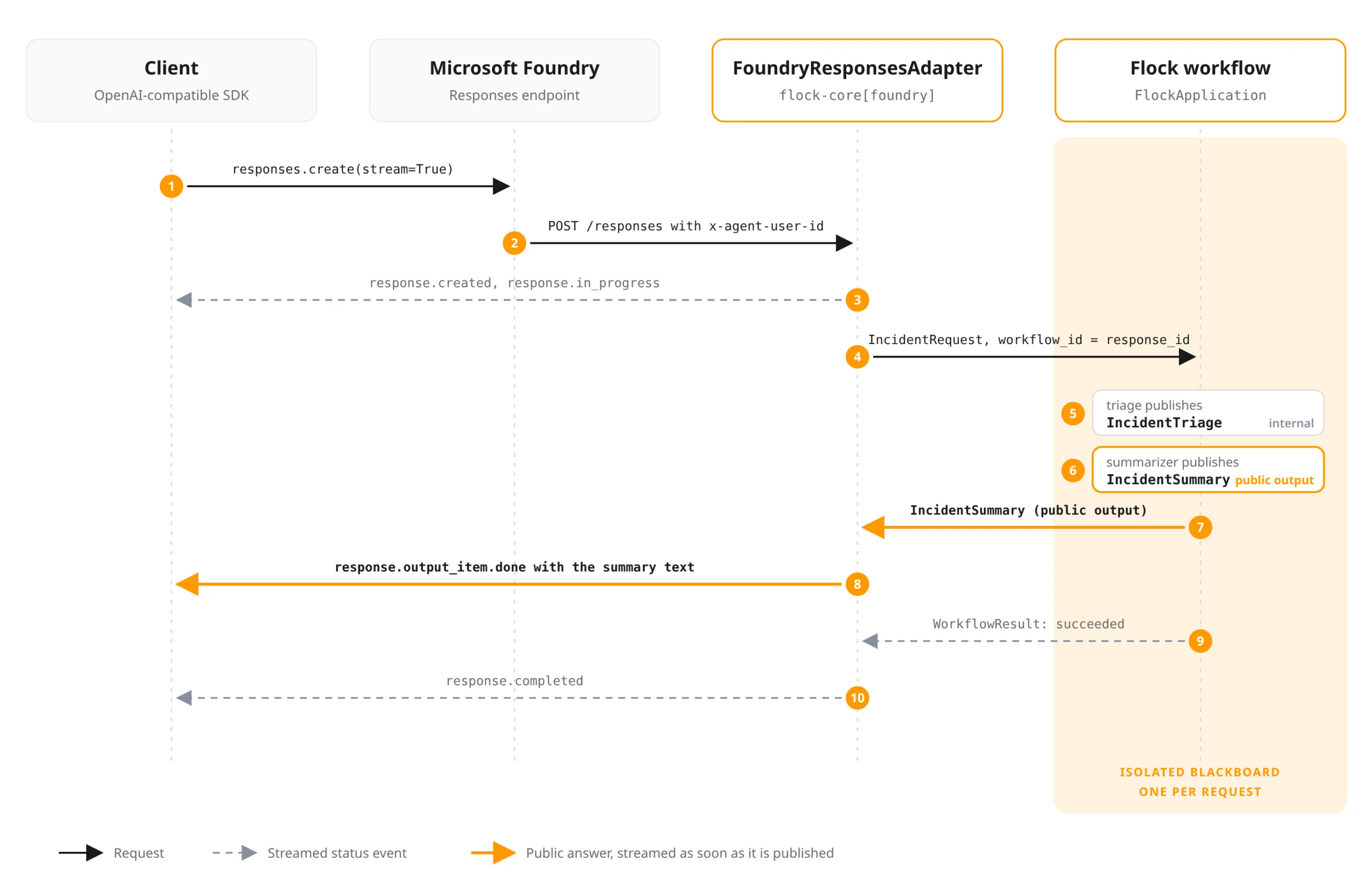
Sequence of a streamed Responses call from the client through Microsoft Foundry and the Flock adapter to an isolated workflow
Which hosting path fits
With FlockApplication, Flock now has three ways to run a crew:
flock.serve() |
FlockApplication in your own host |
Foundry hosted agent | |
|---|---|---|---|
| Per-request isolation | 🔴 | 🟢 | 🟢 |
| Managed infrastructure, identity and scaling | 🔴 | 🟡 | 🟢 |
| Live dashboard | 🟢 | 🔴 | 🔴 |
| Streaming results to the caller | 🟡 | 🟢 | 🟢 |
serve() streams to its dashboard, not to API callers, which is why it gets a yellow mark there. Our recommendations follow directly:
- Shared workspace: if a team works on one shared blackboard and wants to watch it live, use
serve(). - Your own platform: if you already run your own API, queue or platform, embed
FlockApplicationin it. - Agent products on Azure: if you want Entra identity, managed scaling and the Foundry governance story out of the box, run the crew as a Foundry hosted agent.
Try it, and help shape it
Flock is open source under the MIT license, and we build it in the open on GitHub. The sample in examples/14-foundry runs locally without a model and deploys with azd up, and the guides for applications and Foundry hosting cover every option shown here.
Host your own crew and tell us where it breaks. If you miss a capability (crash recovery and token streaming are the obvious candidates), open an issue or start a discussion. And if you want to follow where Flock goes next, star the repository: what people build with it decides what we build next. If you want to run agent crews like this in your own Azure environment, talk to us.