

Microsoft Foundry has lowered the entry barrier for AI agents to such an extent that agents are no longer created solely within development teams. Prompt Agents are declarative agents: the model, instructions, and tools are described, not programmed. This is the speed that business departments need, and one of the reasons why we regularly recommend Foundry in customer projects.
For a custom-developed application, the answer to governance and FinOps is simple because the endpoint is in the code. For a declaratively described agent, there is no code. Nevertheless, the same budgets, the same limits, and the same reporting requirements apply to it as to any other AI solution in the company.
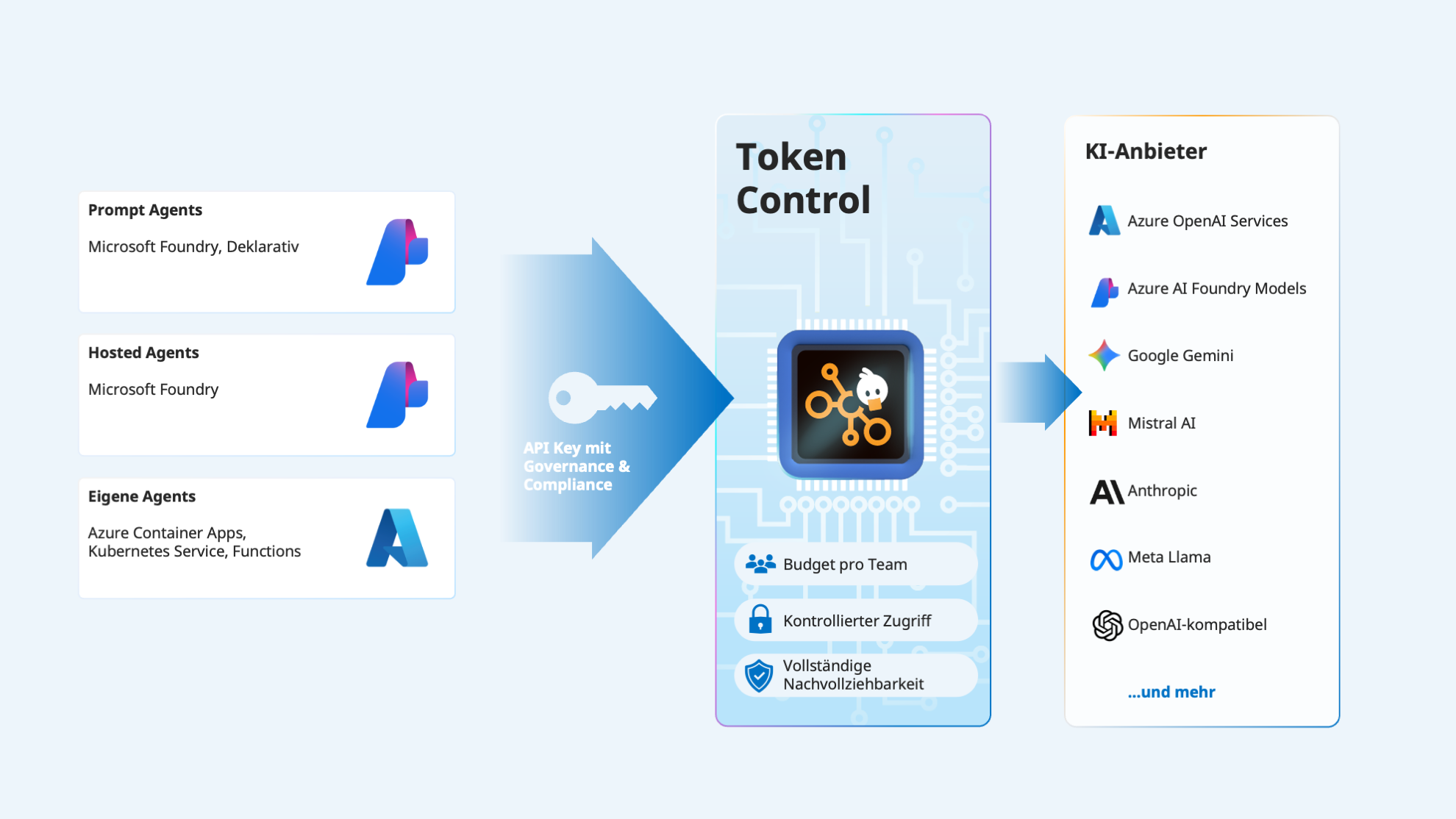
Token Control is an AI control plane between your applications and your models, where budgets, access rules, and records converge. In this post, we show how you can use it to control all agents in Microsoft Foundry, regardless of whether they are declaratively described or custom-developed.
Why rules must sit below the model selection
When teams want to organize their AI usage, they almost always mention the same five requirements: reliable model access, real-time cost transparency, fixed budget limits, allocation per entity, and integration that does not touch existing solutions.
With agents, these requirements become more urgent. A classic AI function consumes tokens per user request. An agent consumes tokens per work step, and the agent decides at runtime how many steps a task requires. What was once a predictable cost item becomes a variable one, and a variable item needs a limit that takes effect before the call.
The crucial factor is where this limit is placed. Anyone describing an agent declaratively selects a model from a list and formulates instructions. There is no application configuration where a platform team could enter an endpoint, and no build process where a policy could be attached. The rules must therefore lie below the model selection so that they reach the agent.
The same standard applies from a regulatory perspective. The EU AI Act and GDPR do not ask whether an agent was developed or configured. They ask who used it, with which model, in which region, and with what result. This information must come from the platform, not from the individual agent.
Prompt Agents via an admin-connected model
Microsoft Foundry allows you to register your own model gateway as a connection. Microsoft calls the result an admin-connected model, and it is created in the Foundry Portal.
Two things are stored: the Token Control endpoint as the connection target and the associated API key. Foundry then calls the endpoint itself and appends the chat completions path, so only the base path needs to be entered. The models that should be usable via this connection are explicitly named.
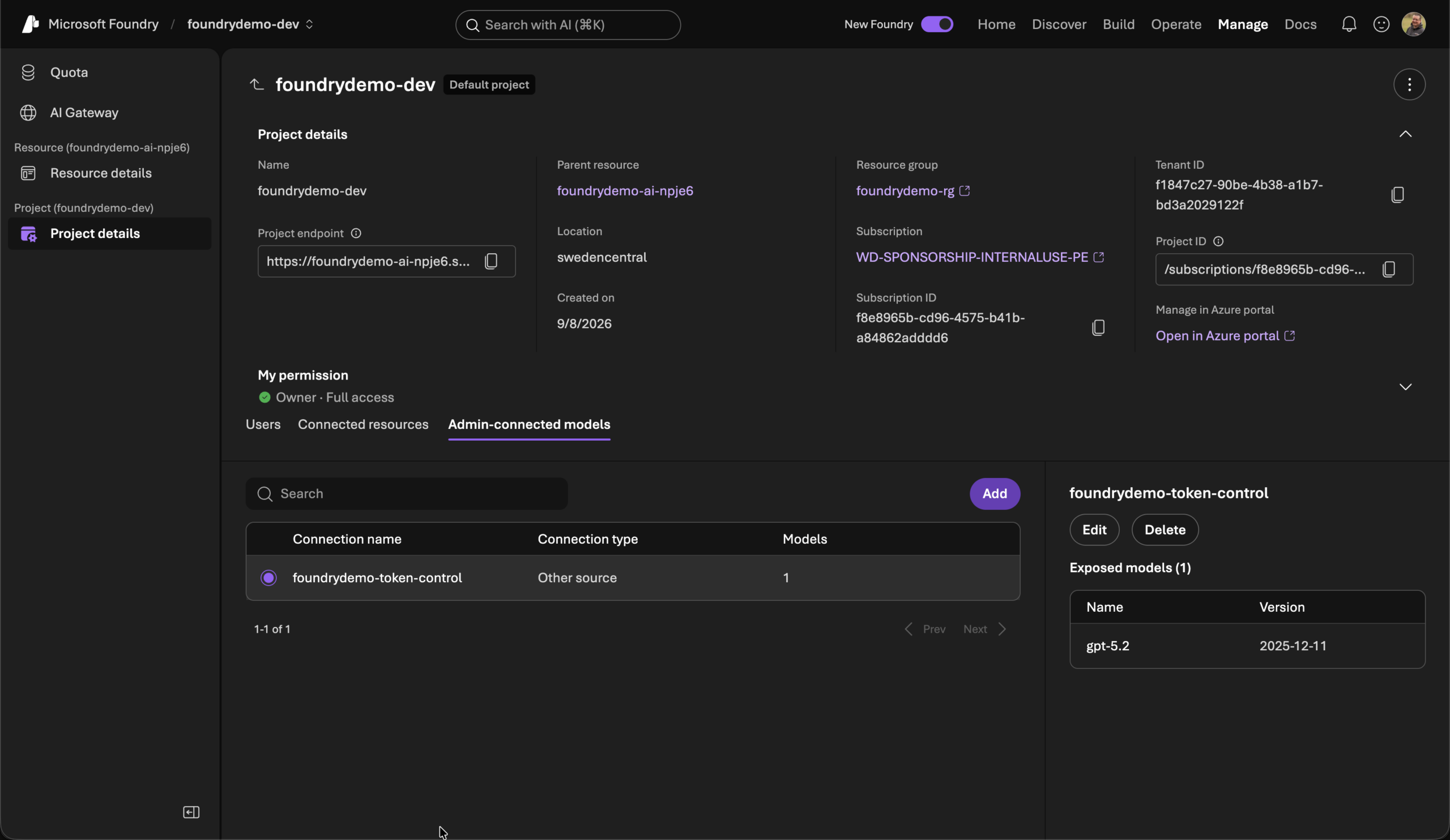
The registered model then appears as a deployment in the model picker of every agent in the project, addressed as <connection-name>/<model-name>.
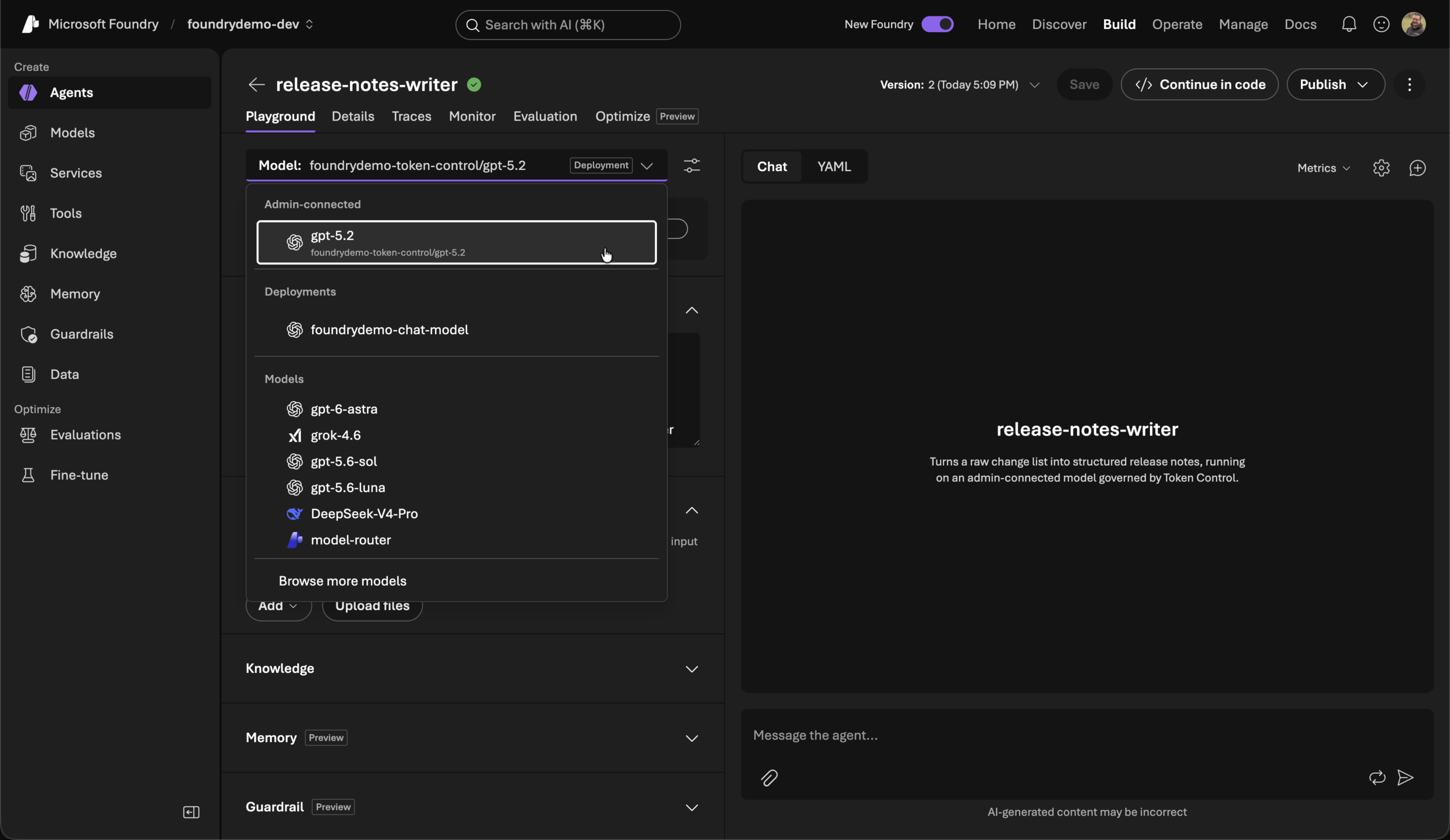
That is all it takes. Anyone describing an agent selects a model from a list. If a model behind Token Control is in this list, the budget, limit, and record-keeping apply from the first call, without the agent’s author having to configure anything or even know about it.
Control plane as code instead of a click
The portal is sufficient for the first agent. For multiple environments and multiple teams, the connection and agent belong in code; otherwise, the control plane remains a one-time click and not a verifiable state.
The connection is a control plane resource. We create it using the AzAPI Terraform Provider, which addresses ARM resources directly:
resource "azapi_resource" "token_control" {
  type      = "Microsoft.CognitiveServices/accounts/projects/connections@2025-04-01-preview"
  name      = local.names.token_control_connection
  parent_id = azurerm_cognitive_account_project.main.id

  body = {
    properties = {
      category      = "ModelGateway"
      target        = var.token_control.base_url
      authType      = "ApiKey"
      isSharedToAll = false
      metadata = {
        deploymentInPath = "false"
        models = jsonencode([{
          name = var.token_control.deployment_name
          properties = {
            model = {
              name    = var.token_control.model_name
              version = var.token_control.model_version
              format  = "OpenAI"
            }
          }
        }])
      }
    }
  }

  sensitive_body = {
    properties = {
      credentials = { key = var.token_control_api_key }
    }
  }
}
Two pieces of information are essential here. isSharedToAll = false limits the connection to one project instead of all projects in the account, keeping the control plane separable per environment. The Token Control API key enters the sensitive_body exclusively via an environment variable and never into a tfvars file.
The separation of roles follows from the same resource. According to Microsoft, creation requires Foundry User or higher on the project and Contributor on the resource group. The connection thus lies with administration, while the agents remain with the functional teams. This is exactly the separation platform teams seek when they want to introduce governance without becoming a bottleneck themselves.
On the other side is the agent. In the Foundry SDK, it remains a standard definition, and the model reference is the only place that makes the difference:
RELEASE_NOTES_WRITER_SPEC = PromptAgentSpec(
    name="release-notes-writer",
    description=(
        "Turns a raw change list into structured release notes, running on an "
        "admin-connected model governed by Token Control."
    ),
    instructions=RELEASE_NOTES_WRITER_INSTRUCTIONS,
    smoke_prompt=RELEASE_NOTES_WRITER_SMOKE_PROMPT,
    validate_smoke=validate_smoke,
    connected_model_env_var="FOUNDRY_CONNECTED_MODEL_DEPLOYMENT_NAME",
)
The declared variable takes precedence over the regular deployment name. The same agent runs on a different model with a different variable, without the instructions or logic changing.
export FOUNDRY_CONNECTED_MODEL_DEPLOYMENT_NAME="$(
  terraform -chdir=infra output -raw connected_model_deployment_name
)"
uv run deploy-agent release-notes-writer
Terraform thus owns the connection, while the SDK owns the agent definition. The control plane and agent are versioned together and are identical across all environments.
Hosted Agents and custom Agents
The same control plane applies to custom-developed agents, connected via the agent’s configuration.
Hosted Agents are containers that Foundry operates for you. They do not access the connection from the previous section but receive the endpoint and key via their own configuration. The base URL is a standard environment variable, and the API key belongs in a Foundry project connection and is resolved at runtime via a placeholder:
services:
  release-notes-writer:
    host: azure.ai.agent
    env:
      OPENAI_BASE_URL: https://<ihr-token-control-host>/api/v1/openai
      OPENAI_API_KEY: ${{connections.token-control.credentials.key}}
The key is therefore neither in the container image nor in the repository. Additionally, Foundry injects FOUNDRY_PROJECT_ENDPOINT, FOUNDRY_AGENT_NAME, and the connection to Application Insights at runtime, so your code knows its own identity and the telemetry target without managing them itself.
The same pattern applies to Azure Container Apps, Azure Kubernetes Service, Azure Functions, and the local development environment, using a restricted API key per workstation.
What you control with it
At this point, both paths converge. The declaratively described Prompt Agent and the custom-developed agent reach the same control plane, and from there, the same rules apply to them, managed by the same people.
Budgets that take effect before the call. You store budgets and limits in Euros per entity, i.e., per user group, department, cost center, or AI solution. Requests are blocked before a limit is exceeded. A rate limit on tokens per minute protects the performance of a platform, while a Euro budget protects a department’s budget.
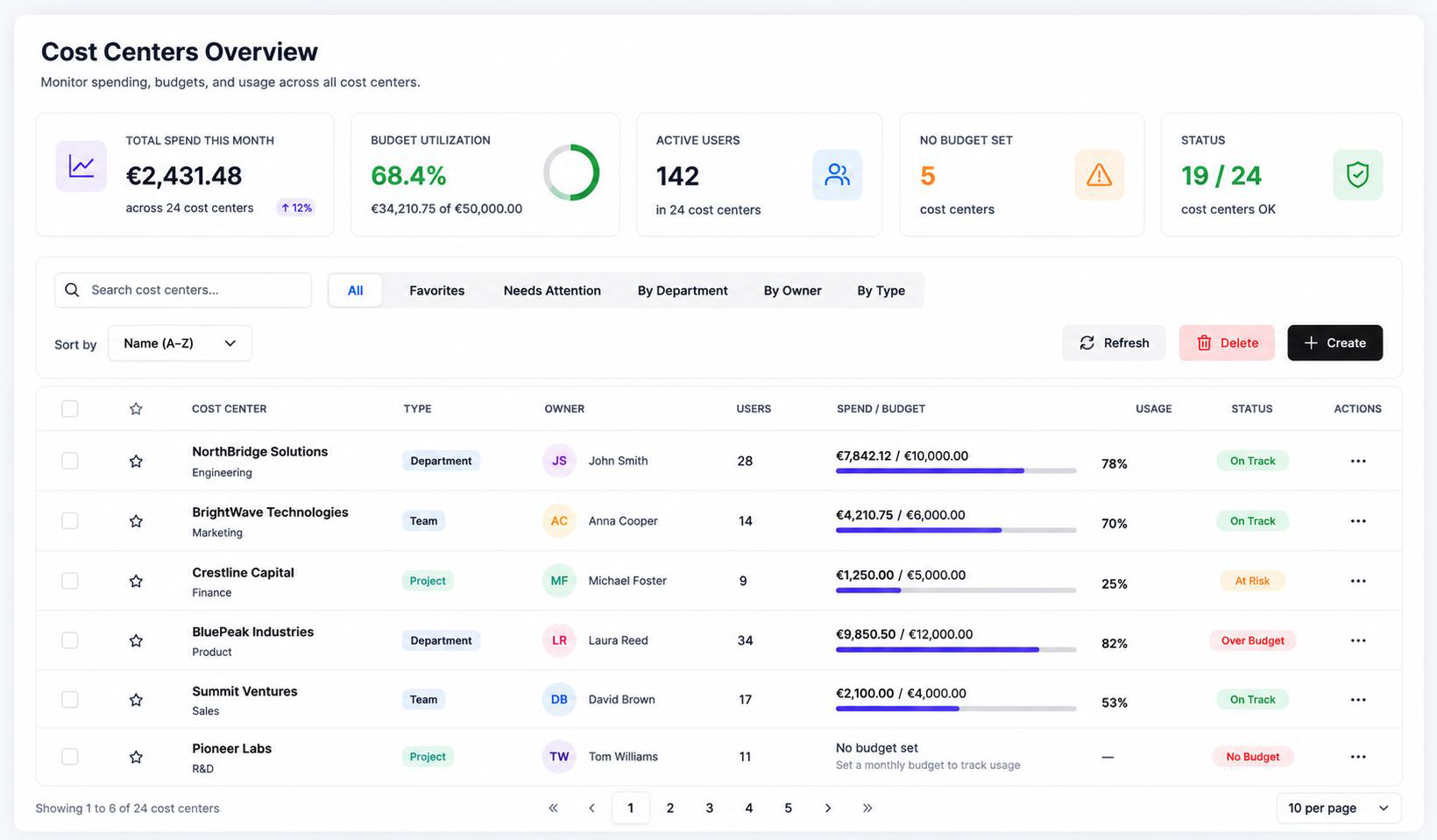
Access assigned to a solution. Every solution, project, and team receives its own restricted API key, the use and costs of which are tracked separately. A rotated or blocked key thus affects exactly one solution and not the entire AI usage. A TPM limit per application additionally ensures that no single application dominates capacity, and access remains restricted to the models you have approved.
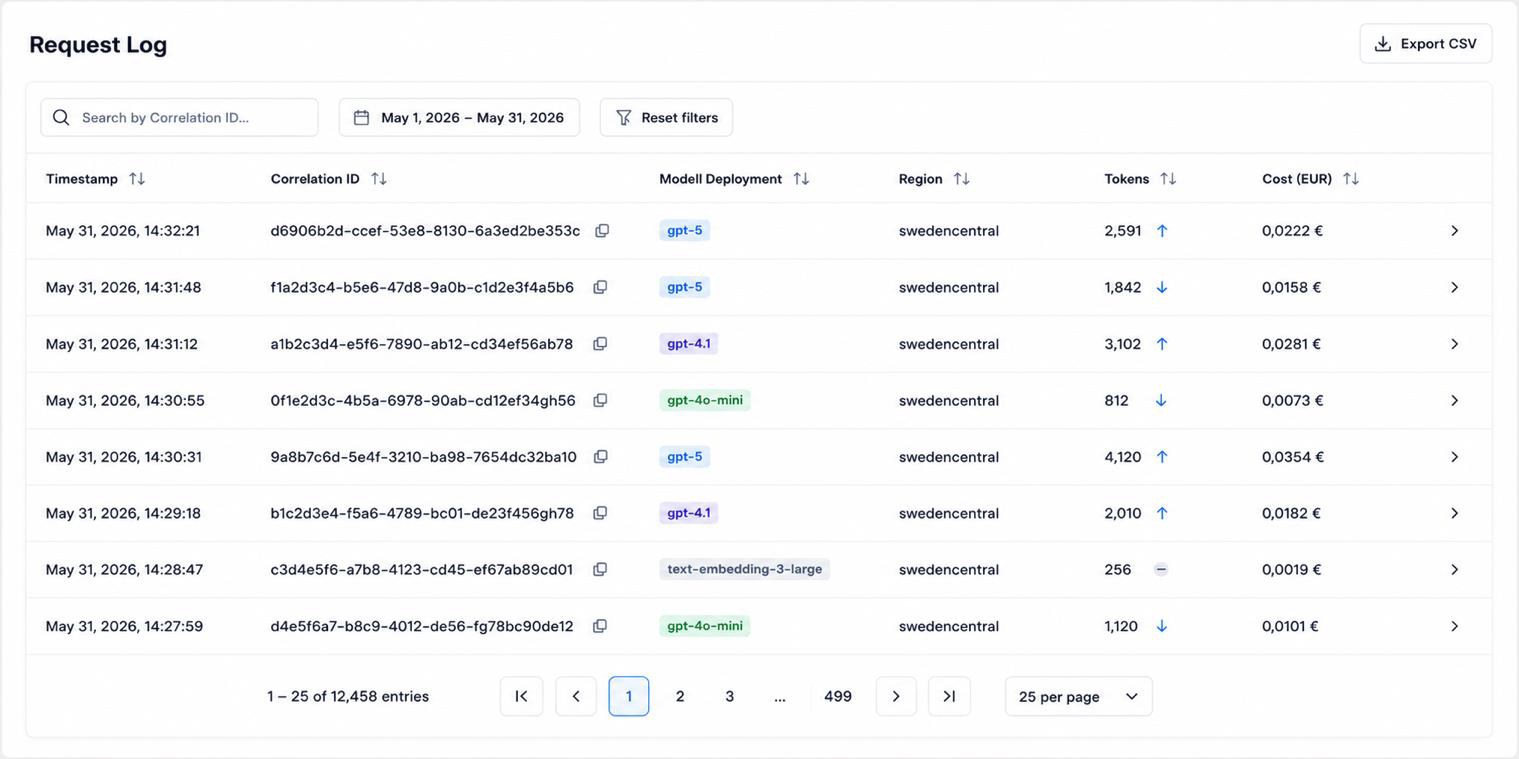
Records that withstand an audit. Every request is logged via a correlation ID, including tokens, model, region, timestamp, and cost.
Prompt and response content are not stored; processing and storage take place in the EU. The compliance dashboard also shows the regional distribution of the models used and the status of the content filters. This creates an auditable basis that supports the transparency requirements of the EU AI Act without you having to archive your users’ conversation content.
The view from Foundry remains fully preserved. Runs, steps, latency, and errors continue to be visible via traces and the Monitor tab, connected to your Application Insights resource.