

The problem with secrets in CI/CD pipelines
Secrets in CI/CD pipelines have an expiration date. And at some point, someone forgets to renew them in time. Anyone running Infrastructure as Code with Terraform on Azure knows the drill: a service principal is created, the client secret ends up in Key Vault or directly in the pipeline variables, and everything works. Until the secret expires. Or gets leaked. Or someone forgets to rotate it.
The reality looks like this:
- Secrets must be rotated—and regularly. If you forget, you risk outages.
- Secrets can be leaked—through logs, misconfiguration, or compromised systems.
- Secrets are attack vectors. A stolen client secret grants full access to Azure resources.
The good news: There is a better way. With Workload Identity Federation (OIDC), GitHub Actions and Azure DevOps pipelines can authenticate directly with Azure—without any stored secrets.
In this post, we show how our updated Terraform scaffolding for Azure supports this approach out of the box and how you can switch to “secretless” in just a few minutes.
What is Terraform scaffolding for Azure?
Before you can get started with Terraform on Azure, you need a solid foundation: a service principal with the right permissions, a storage account for the Terraform state, and—until now—a secure place for secrets. That is exactly what we solved some time ago with our Terraform Scaffold for Azure. If you do not yet know the original announcement post: the repository provides a simple setup script that provisions everything you need in just a few minutes.
What do you get out of the box?
| Component | Description |
| Service Principal | With the Contributor and Role Based Access Control Administrator roles (restricted by conditions) |
| Storage Account | For the Terraform state, with a soft-delete policy enabled |
| Entra ID permissions | The service principal receives Graph API permissions (Group.ReadWrite.All, GroupMember.ReadWrite.All, User.Read.All) to manage groups and identities with the azuread provider. Requires admin consent. |
| Bash & PowerShell support | Scripts for both environments |
The goal from the very beginning was: production-ready in under 10 minutes—without manual clicking in the Azure portal.
What is new? OIDC as the default
The biggest change in the repository: OIDC is now the default.
Previously, the focus was on the classic approach with client secret + Key Vault. It works, but it comes with the well-known drawbacks. Secrets must be stored securely, rotated, and managed.
With the update, we changed the structure:
- Root directory: Workload Identity Federation for GitHub Actions or Azure DevOps—recommended
- client-secret directory: Classic approach with Key Vault—for scenarios where OIDC is not possible
What does “secretless” mean?
With the OIDC variant, no client secret is created or stored anymore. Instead, GitHub Actions or Azure DevOps issues a short-lived token that Azure validates directly against the federated credential. The result:
- No secret in Key Vault
- No secret in pipeline variables
- No secret that needs to be rotated
- No secret that can be leaked
The service principal still exists, but without permanent credentials.
Why is OIDC more secure?
With client secrets, there is always a time window in which a stolen secret can be abused. Even if the secret is never intentionally shared, it can leak through debug logs, incorrect masking, or compromised backups. Once leaked, an attacker has full access until someone notices and rotates the secret.
With OIDC, this time window practically does not exist. The token issued by GitHub is only valid for a few minutes and is tied to a specific workflow run. Even if it were intercepted, it would already have expired before an attacker could use it.
More importantly, control no longer lies with the secret, but with the origin. Entra ID checks whether the token actually comes from GitHub, whether it was issued for the correct repository, and whether the environment matches. A fork of the repository or a workflow from another branch is rejected—even if the attacker has access to the GitHub secrets.
Comparison: client secret vs. OIDC
| Aspect | Client secret | OIDC (Workload Identity Federation) |
| Secret rotation required? | Yes, every 1–2 years | No |
| Leak risk | Present | Eliminated |
| Control over source | None (whoever has the secret has access) | Repo, branch, environment |
| Recommended by Microsoft | Legacy | Best practice |
How does Workload Identity Federation work?
For anyone who wants to understand what happens under the hood, here is the OIDC authentication flow.
The authentication flow in four steps:
- GitHub Actions / Azure DevOps starts and requests an OIDC token from its identity provider
- The CI/CD provider issues a signed JWT that contains information such as: repository, branch, environment, workflow
- The token is sent to Entra ID, together with the client ID of the service principal
- Entra ID validates the token against the configured federated credential—if issuer, subject, and audience match, an Azure access token is issued
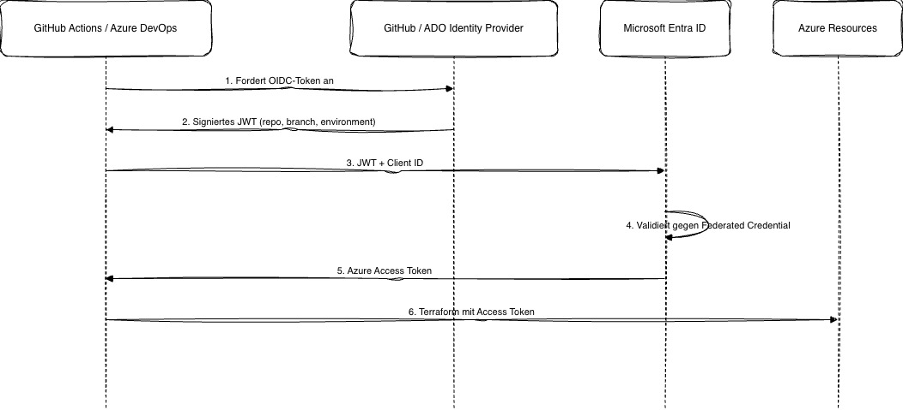
The federated credential defines three validation points. Access is granted only if all three fields match exactly. A token from another repository or branch is rejected.
| Field | GitHub example | Azure DevOps example |
| Issuer | https://token.actions.githubusercontent.com | https://vstoken.dev.azure.com/<org-id> |
| Subject | repo:org/repo:environment:prod | sc://org/project/service-connection |
| Audience | api://AzureADTokenExchange | api://AzureADTokenExchange |
Quick start: Go secretless on Azure in 5 minutes
Here is the quick guide to set up the Terraform scaffolding with OIDC.
Prerequisites
- Azure CLI installed and authenticated (az login)
- Bash with jq or PowerShell
- Azure permissions: Subscription Owner (or Contributor + User Access Administrator) and Application Developer in Entra ID
Step 1: Clone the repository
- git clone https://github.com/whiteducksoftware/terraform-scaffold-for-azure.git
- cd terraform-scaffold-for-azure
Step 2: Adjust the .env file with the desired names
Step 3: Configure the federated credential
- For GitHub Actions—adjust federated_credential_github.json
- For Azure DevOps—adjust federated_credential_ado.json
Step 4: Run the setup script (up.sh used as an example here)
In up.sh, select the correct credential file and run it:
- # FEDERATED_CREDENTIAL_FILE=”federated_credential_github.json” # for GitHub
- # FEDERATED_CREDENTIAL_FILE=”federated_credential_ado.json” # for Azure DevOps
Step 5: Configure the CI/CD pipeline (GitHub Actions example)
name: TF Deploy
on:
  workflow_dispatch:
  push:
    branches:
      - 'main'

# OIDC-Authentifizierung erfordert diese Permission.
# Ohne 'id-token: write' kann der Workflow kein OIDC-Token anfordern.
permissions:
  id-token: write
  contents: read

env:
  tf_version: 1.14.3
  # Aktiviert OIDC für den AzureRM Terraform Provider.
  # Damit entfällt ARM_CLIENT_SECRET komplett.
  ARM_USE_OIDC: true
  # Nutzt Entra ID Auth für den Storage Account statt Access Keys.
  ARM_USE_AZUREAD: true

jobs:
  deploy-dev:
    name: Deploy DEV
    runs-on: ubuntu-latest
    # Das Environment muss exakt mit dem 'subject' in der Federated Credential übereinstimmen.
    # Beispiel: repo:org/repo:environment:dev
    # Ein Workflow ohne passendes Environment wird von Entra ID abgelehnt.
    environment: dev
    env:
      stage: dev
      rg_name: '<your-resource-group-name>'
      sa_name: '<your-storage-account-name>'
      sc_name: '<your-blob-name>'
      # Diese drei Werte sind KEINE Secrets im klassischen Sinne.
      # Sie sind öffentliche Identifier – ein Angreifer kann damit alleine nichts anfangen.
      # Die Authentifizierung erfolgt ausschließlich über das signierte OIDC-Token.
      ARM_CLIENT_ID: ${{ secrets.ARM_CLIENT_ID }}
      ARM_SUBSCRIPTION_ID: ${{ secrets.ARM_SUBSCRIPTION_ID }}
      ARM_TENANT_ID: ${{ secrets.ARM_TENANT_ID }}
    steps:
      - name: Checkout
        uses: actions/checkout@v4

      # OIDC-Login: Kein client-secret Parameter!
      # Die Action fordert automatisch ein OIDC-Token von GitHub an
      # und tauscht es bei Entra ID gegen ein Azure Access Token.
      - name: Azure CLI login
        uses: azure/login@v2
        with:
          client-id: ${{ secrets.ARM_CLIENT_ID }}
          tenant-id: ${{ secrets.ARM_TENANT_ID }}
          subscription-id: ${{ secrets.ARM_SUBSCRIPTION_ID }}

      - name: Setup Terraform
        uses: hashicorp/setup-terraform@v3
        with:
          terraform_version: ${{ env.tf_version }}

      # Terraform nutzt die OIDC-Session aus dem azure/login Step.
      # Keine zusätzlichen Credentials nötig – ARM_USE_OIDC übernimmt den Rest.
      - name: Terraform Init
        run: |
          terraform init -input=false \
              -backend-config="resource_group_name=${{ env.rg_name }}" \
              -backend-config="storage_account_name=${{ env.sa_name }}" \
              -backend-config="container_name=${{ env.sc_name }}" \
              -backend-config="key=${{ env.stage }}.tfstate"

      - name: Terraform Format
        run: terraform fmt --check

      - name: Terraform Validate
        run: terraform validate

      - name: Terraform Plan
        run: |
          terraform plan \
           -var-file=./env/${{ env.stage }}.tfvars \
           -out ${{ env.stage }}_tfplan.out

      - name: Terraform Apply
        run: terraform apply -auto-approve ${{ env.stage }}_tfplan.out
Migration: From client secret to Workload Identity Federation
If you are already using the Terraform scaffolding with a client secret, you can switch to OIDC in just a few steps.
Azure DevOps
To switch the existing Azure DevOps service connection and service principal to federated credentials in the simplest way, proceed as follows:
- Create another service connection of type “Azure Resource Manager”.
- Select “App registration or managed identity (manual)”.
- Set the credential to “Workload Identity Federation”.
- Assign a name and enter your tenant ID.
- In the next step, copy the issuer and the subject identifier and keep them for later.
- Then complete and save the service connection.
- Switch to Entra ID and edit the service principal.
- Under “Certificates and secrets”, create a federated credential and select “Other issuer” as the scenario.
- Insert the issuer and subject identifier from step 6 and save.
- Update the pipeline to use the new service connection. Afterwards, the old service connection with the credential type “Secret” can be removed.
- The secret on the service principal should also be deleted.
GitHub
For migration to a federated identity credential for GitHub, the following steps are required:
- Switch to Entra ID and edit the service principal.
- Under “Certificates and secrets”, create a federated credential and select “GitHub Actions deploying Azure resources” as the scenario.
- Set organization, repository, and entity type so that the following subject identifier results: repo:myorg/myrepo:environment:dev (using the dev environment as an example).
- The secret on the service principal should also be deleted.
In both cases, the pipeline or workflow must be updated to use secret-free authentication.
Conclusion
Secrets in CI/CD pipelines are a thing of the past—at least for authentication to Azure. With Workload Identity Federation, Microsoft provides a secure, maintenance-free way to connect GitHub Actions and Azure DevOps pipelines to Azure. No client secret that needs to be rotated. No leak risk from accidentally logged credentials. No nightly pipeline outages because someone forgot the rotation.
Our updated Terraform scaffolding for Azure makes getting started as easy as possible:
- OIDC is now the default—the secure option is also the simplest
- Both GitHub Actions and Azure DevOps are supported
- One script, five minutes, and the infrastructure is ready
If you have any questions, issues, or suggestions for improvement, please contact us! We are happy to help and welcome issues and pull requests in the repository.